Project VRS (VR Spacecraft Simulator)
An independent project where I focused on developing advanced VR systems and engaging gameplay mechanics for a spacecraft simulator.
Project Overview & Features
- Developed an immersive flight control system for VR spacecraft with comprehensive dual-joystick functionality.
- Implemented real-time management of subsystems like targeting and power delivery.
- Collaborated on a physics-simulated flight system with 3D controls for enhanced realism.
- Designed and implemented dynamic combat environments with waves of enemies, customizable missions, and unique factions.
- Integrated positional tracking turrets and missiles for improved accuracy and interactivity.
Skills & Technologies Applied
Learning & Growth
This project was a significant learning experience, allowing me to dive deep into complex game systems and VR interactions. It honed my problem-solving skills and my ability to work with advanced Unity features and mathematical concepts crucial for realistic simulations.
Visuals & Code Snippets
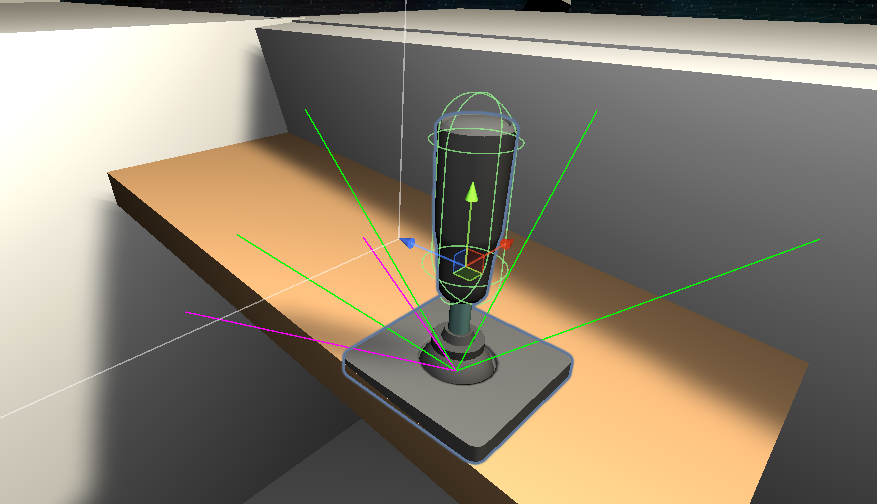
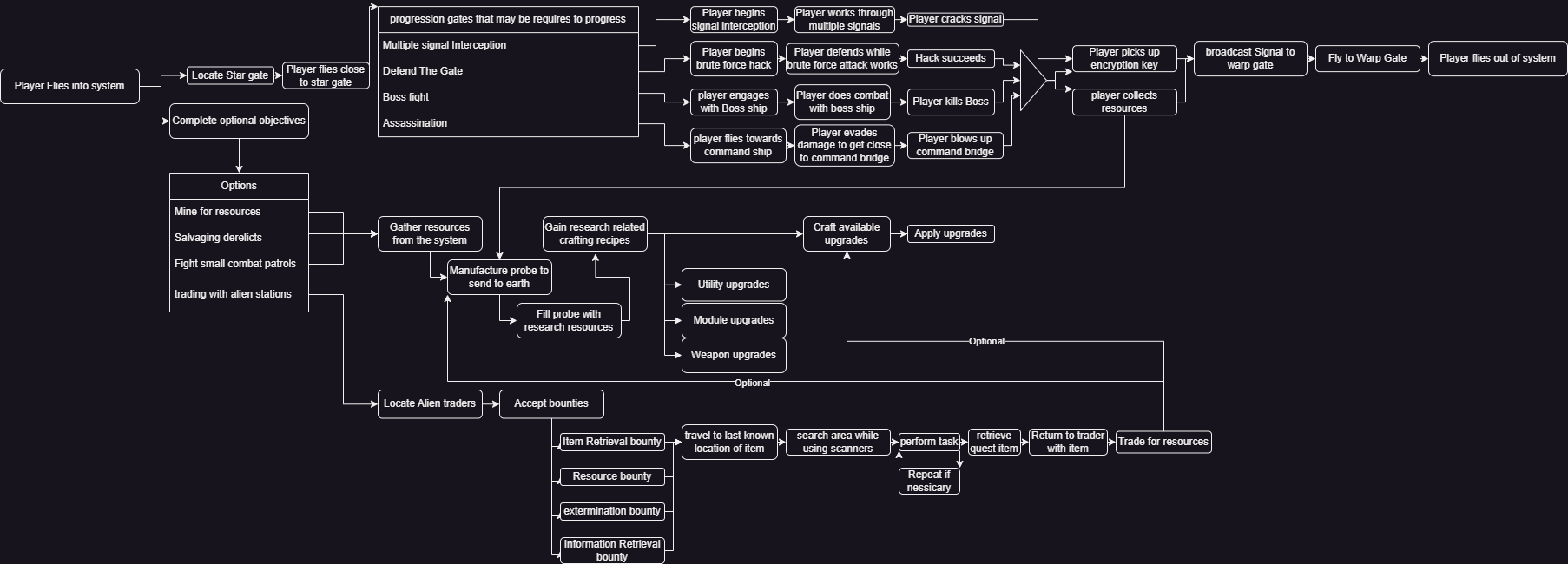
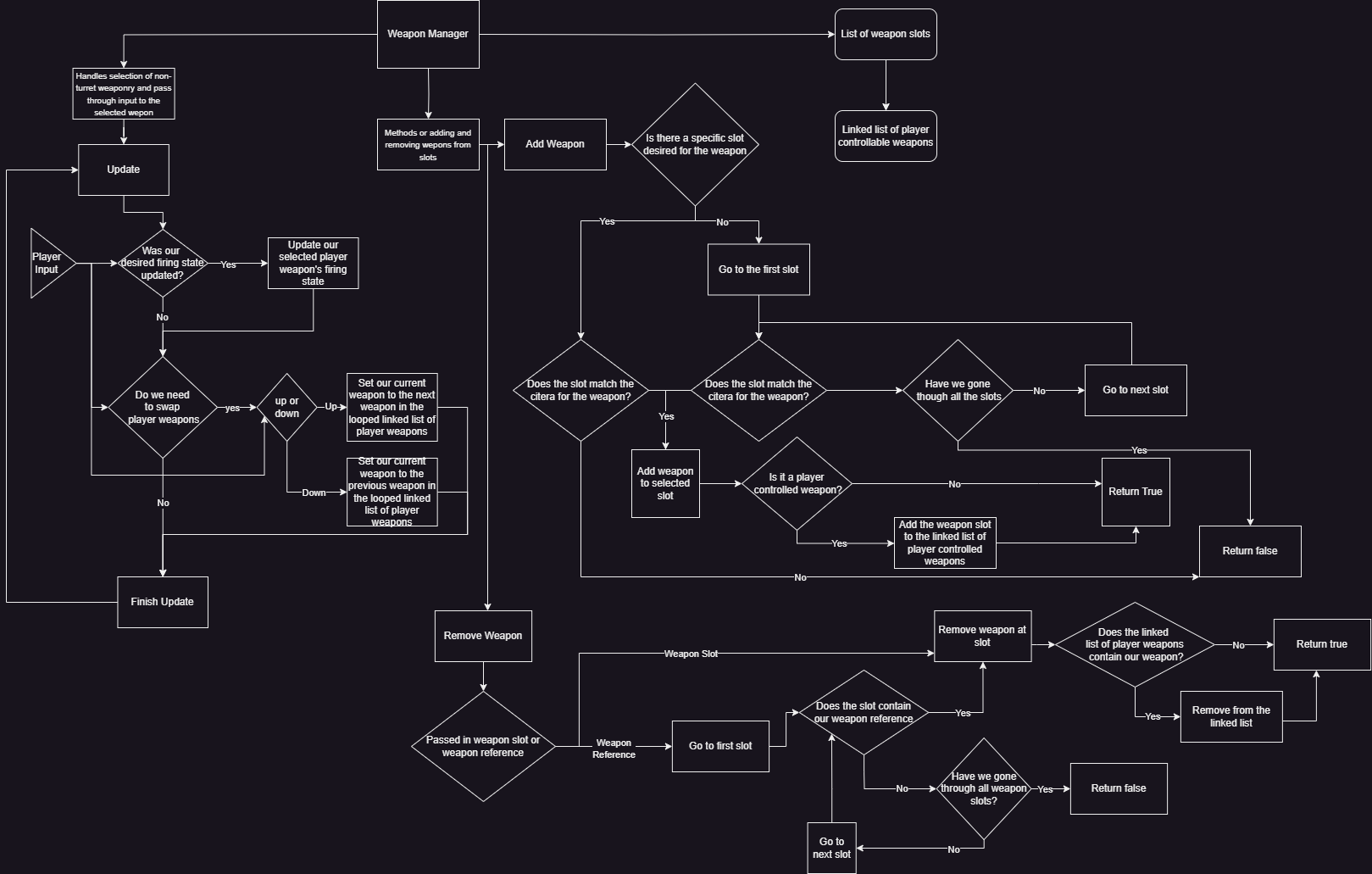
A collection of screenshots showcasing the VR joystick, development progression, and the weapon manager interface within Project VRS. Scroll to view all images.
Code Snippet: VR Flight Movement Code
public class IM_ShipMovementController : BC_ShipMovementController
{
    //magic numbers for remapping the vector inputs
    const float m_lowerJoystickInputBounds = -1f;
    const float m_upperJoystickInputBounds = 1f;

    //continously applied vectors that change upon setting values for the inputs
    protected Vector3 m_savedForwardVector;

    protected Vector3 m_savedPitchAxis;
    protected float m_savedPitchSpeed;

    protected Vector3 m_savedRollAxis;
    protected float m_savedRollSpeed;

    protected Vector3 m_savedStrafeVector;

    protected Vector3 m_savedYawAxis;
    protected float m_savedYawSpeed;

    protected bool m_toggleYawForStrafe;

    protected float m_brakingForce;


    protected virtual void FixedUpdate()
    {
        //this will apply all current inputs
        ApplyAllCurrentForces();
    }

    private void ApplyAllCurrentForces()
    {
        //linear motion
        ApplyLinearMotionValue(m_savedForwardVector);

        //roll and pitch rotations
        ApplyRotationOnAxis(m_savedPitchAxis, m_savedPitchSpeed);
        ApplyRotationOnAxis(m_savedRollAxis, m_savedRollSpeed);

        //apply strafe movement
        ApplyStrafe(m_savedStrafeVector);

        //yaw rotations
        ApplyRotationOnAxis(m_savedYawAxis, m_savedYawSpeed);

        //finally, prevent the speed from breaching the speed cap
        ClampVelocityToMaxSpeed();
    }

    protected void SaveNewLinearMotionVector(float rawThrottleInput)
    {
        //remap the joystick value
        float appliedThrustValue = ExtensionMethods.Remap(rawThrottleInput,        // Value to modify
                                        m_lowerJoystickInputBounds, // Lower original bound
                                        m_upperJoystickInputBounds, // Upper original bound
                                        m_maxDeceleration,          // Lower new bound
                                        m_maxAcceleration);         // Upper new bound

        //create a forward vector of the speed we want to move
        Vector3 forwardVector = new Vector3(0f, 0f, appliedThrustValue);

        //save the value
        m_savedForwardVector = forwardVector;
    }

    protected void SaveNewRotationOnAxis(ShipJoystickInput currentInput)
    {
        //ADD-RELATIVE-TORQUE ROTATES THE BODY CLOCKWISE AROUND THE AXIS (if it is counter clockwise your visualization is upside down)

        //remap the joystick values
        float newPitchRotationSpeed = currentInput.PrimaryFlightStick.y * m_maxRateOfPitch;

        float newRollRotationSpeed = currentInput.PrimaryFlightStick.x * m_maxRateOfRoll;

        float newYawRotationSpeed = currentInput.PrimaryYawValue * m_maxRateOfYaw;


        //since the axis is a normalized vector we can just multiply it to get our torque value
        Vector3 pitchTorqueVector = ReturnTorqueVector(newPitchRotationSpeed, Vector3.left);
        Vector3 pitchAxisWithMappedSpeed = -pitchTorqueVector * Mathf.Abs(newPitchRotationSpeed);

        Vector3 rollTorqueVector = ReturnTorqueVector(newRollRotationSpeed, Vector3.forward);
        Vector3 rollAxisWithMappedSpeed = -rollTorqueVector * Mathf.Abs(newRollRotationSpeed);

        //Yaw ONLY
        //determine the direction based on the torque roation
        Vector3 yawTorqueVector = ReturnTorqueVector(currentInput.PrimaryYawValue, Vector3.up);

        //set the vector to be the speed of the rotation
        Vector3 yawAxisWithMappedSpeed = yawTorqueVector * Mathf.Abs(newYawRotationSpeed);

    //Saving

        //save Pitch
        m_savedPitchAxis = pitchAxisWithMappedSpeed;
        m_savedPitchSpeed = newPitchRotationSpeed;

        // and roll
        m_savedRollAxis = rollAxisWithMappedSpeed;
        m_savedRollSpeed = newRollRotationSpeed;

        //save yaw
        m_savedYawAxis = yawAxisWithMappedSpeed;
        m_savedYawSpeed = newYawRotationSpeed;
    }

    protected void SaveNewStrafeVector(float rawYawInput)
    {
        //remap the joystick value
        float appliedYawValue = ExtensionMethods.Remap(rawYawInput,                // Value to modify
                                      m_lowerJoystickInputBounds, // Lower original bound
                                      m_upperJoystickInputBounds, // Upper original bound
                                      -m_maxStrafeSpeed,          // Lower new bound
                                      m_maxStrafeSpeed);          // Upper new bound

        //set the vector for the strafe to the speed of the strafe value
        Vector3 strafeVector = new Vector3(appliedYawValue, 0f, 0f);

        //save the values
        m_savedStrafeVector = strafeVector;
    }

    protected Vector3 ReturnTorqueVector(float input, Vector3 AxiOfRotation)
    {
        if (input > 0f)
        {
            return AxiOfRotation;
        }
        else if (input < 0f)
        {
            return -AxiOfRotation;
        }
        else return Vector3.zero;
    }
}
This is part of the code that handles tranaslations from virtual joysticks to Ship movement and rotation. It highlights the precise handling of player inputs and their translation into dynamic ship movements within the physics-driven environment.
Code Snippet: Ship Module State Management
 IEnumerator StartUpRoutine()
 {
     //do any logic before the module turns on
     PreStartUpLogic();

     //set as preparing for both the core module state and the operational state
     m_operationalState = ICoreModule.ModuleOperationalState.Preparing;
     OnModuleOperationalStateChange.Invoke(m_operationalState, this, ICoreModule.ModuleStateChangeType.OperationalState);

     m_coreState = ICoreModule.CoreModuleState.Disabled;
     OnCoreModuleStateChange.Invoke(m_coreState, this, ICoreModule.ModuleStateChangeType.CoreState);

     //wait
     yield return new WaitForSeconds(m_startUpDelay);

     //do post start up logic
     PostStartUpLogic();

     m_coreState = ICoreModule.CoreModuleState.Operational;
     OnCoreModuleStateChange.Invoke(m_coreState, this, ICoreModule.ModuleStateChangeType.CoreState);

     m_operationalState = ICoreModule.ModuleOperationalState.Active;
     OnModuleOperationalStateChange.Invoke(m_operationalState, this, ICoreModule.ModuleStateChangeType.OperationalState);
 }

 IEnumerator ShutDownRoutine(bool isRebooting)
 {
     //logic before the shut down
     PreShutDownLogic();

     //set as preparing for both the core module state and the operational state
     m_operationalState = ICoreModule.ModuleOperationalState.Preparing;
     OnModuleOperationalStateChange.Invoke(m_operationalState, this, ICoreModule.ModuleStateChangeType.OperationalState);

     m_coreState = ICoreModule.CoreModuleState.Standby;
     OnCoreModuleStateChange.Invoke(m_coreState, this, ICoreModule.ModuleStateChangeType.CoreState);

     //wait
     yield return new WaitForSeconds(m_shutDownDelay);

     //call post process logic
     PostShutDownLogic();

     m_coreState = ICoreModule.CoreModuleState.Disabled;
     OnCoreModuleStateChange.Invoke(m_coreState, this, ICoreModule.ModuleStateChangeType.CoreState);

     //reboot notifiers
     if (isRebooting)
     {
         m_operationalState = ICoreModule.ModuleOperationalState.Rebooting;
         OnModuleOperationalStateChange.Invoke(m_operationalState, this, ICoreModule.ModuleStateChangeType.OperationalState);
     }
 }

 IEnumerator RebootRoutine()
 {
     //shutdowm then start up
     StartCoroutine(ShutDownRoutine(true));
     yield return new WaitForSeconds(m_rebootDelay);
     StartCoroutine(StartUpRoutine());
 }
This code snippet illustrates the event-driven state management for a ship module within Project VRS. It defines coroutines for handling the module's startup, shutdown, and reboot sequences, including delays and notifications for state changes, crucial for managing complex ship systems.